|
WM Capture 10
The highest quality screen recorder
WM Capture is
excellent for recording streaming movies or any other video and audio
playing on your screen and speakers, including video games, webinars, chat
sessions, and more, all in high quality. It uses GPU and monitors the CPU
to prevent your computer from overheating.
It
supports Intel Quick Sync, NVIDIA NVENC, and Direct3D.
Free Your Desktop While Recording
WM Capture 10 is the only screen capture software that enables
you to record video from hidden and overlapped windows. By activating
"Background Mode" and choosing the video window to record, your
video can be hidden, keeping your desktop available for other applications.
Comprehensive
documentation covers all features, focusing on capturing streaming movies
with advanced options like image rescaling, audio rerouting, and background
mode.
The software includes features such as multiple scheduled recordings,
support for HD and 4K dual monitors, video frame snapshots during
recording, and much more.
Versions 10.12.7.5 and above feature audio/video rerouting capability
allowing simultaneous playback and recording of video and audio on the same
device.
Versions 10.12.7.6 and above feature video resizing capability to greatly
enhance recording quality when capturing movies played on UHD monitors
without NVIDIA support. (check article
Screen Capture movies the proper way );
Latest released version 12.10.10.3
released 10.21.2026
Download
WM Capture 10v12
version 12.10.10.3 (released Aug 21, 2026)
(includes DD3, WMC Game and WM Converter 8)
Download WM
Capture 10v12
(version 12.10.10.3 - 2nd download site)
Download WM
Capture 10v12
(version 12.10.10.3 - 3rd download site)
Previous version WM Capture 10v12
(version 12.10.10.2 released Sep, 10, 2026)
WM Recorder sister websites
WM Recorder Pro - wmrecorderpro.com
Media-recording media-recording.com
A1C
Estimate a1cestimate.com
D3D Recording
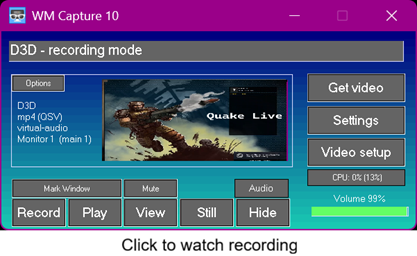
Beginning with version 12, the D3D recording mode was added
because recent software updates from Google and Microsoft to their web
browsers disabled the Background recording mode. D3D mode is currently the
preferred recording option, especially on Windows 11. It enables recording
of high-motion videos, 2K or 4K movies, and video games at frame rates up
to 100 fps while maintaining low CPU usage.
IMPORTANT NOTE:
Starting in June 2025, Google Chrome and Google Chrome Canary browsers have
disabled the Background mode required for video rerouting on Windows 11. WM
Capture resolves this blunder by allowing rerouting compatibility with
alternative browsers like Firefox. Video/audio rerouting using the Google
Chrome or the Canary browser is unchanged and still available on Windows
10, 8, 7.
|
|
WM Recorder YT-2
(version 4.3.0 08/27/26)
Easy powerful and convenient
stream downloader, screen recorder, audio capture,
video/audio converter all in one easy to use program

WM Recorder YT based on
youtube-dl (currently yt-dlp) is a powerful way to download YouTube videos, video
playlists and many other video and audio files from the Internet. Just open
your video site, click Get URL in your Chrome browser and your
video/ audio is downloaded automatically.
You have the ability to learn how to download
YouTube videos on your own and occasionally troubleshoot our software. A
batch file is included for you to use in practicing and adjusting the
yt-dlp downloader for your needs.
The Video Clone mini-screen recorder allows you to
record any video played on your screen. This is especially useful for
recording LIVE YouTube shows and purchased movies.
WM Audio recorder can be used to record any sound
played by your speakers.
WM Converter converts your downloads to many
video/audio formats. For best conversion results, download the new release,
WM Converter Pro 8.
Find out Why WM Recorder YT is such a great downloader, screen capture, audio
recorder and video converter all in one easy to use program.
Download WM Recorder YT-2
Download WM Recorder YT-2
(2nd download site)
Note: due to Google / Chrome late protective
measures some video downloads from YouTube may not work if you are using a
VPN software. Sometimes it is necessary to be Signed In on the Chrome or
other chromium based browsers.
=========================================
WMC Game
Video Game recording enhancer

WMC Game works
along with the Windows Game Bar app, offering a range of enhancements for
capturing video games. With WMC Game and the Game Bar, users can record not
only games but also movies and videos played on their computer screens.
Included with WM Capture 10.7 or higher versions.
Download WM
Capture 10v12
----------------------------------------------------------
NOTE: Replay Video Capture software versions distributed by Applian (www.applian.com) between
2010 and 2025 are no longer available at this website. The software was
transferred to the developers (company AllAlex, Inc., as indicated under
Replay Video Settings > Help > About). The developers now offer WM Capture, an improved version at WM Recorder
website. More details here.
|
|
Video Converter Pro 8
Multi-tasking
Video converter Audio converter and Editor

Reliable,
fast, easy to use
Converts all popular video and audio formats
Split/trim video or audio in seconds
Join video or audio files of any formats
Rescale video to mobile screen size
Maintains aspect ratio
Slow/Fast motion effects
Converts/Joins camera DVD files
Makes DVD/ISO files
Frame analyzer included
Fast conversion (typical 1/10 play time)
Find
out Why WM Converter Pro
is different than other video/audio converters.
NEW WM
Converter Pro 8
Download WM
Converter Pro 8
version
8.7 (released Aug 08, 2025)
===========================================
YTV Clone (new)
Watch sports, movies, video shows while working from
your home
YTV Clone transforms your computer into a multi-viewing
entertainment center, with the ability to watch multiple streams at the
same time. A
simple app (2.1 KB) which clones the Chrome browser windows and creates Picture
in Picture (PIP) videos.
What's this YTV Clone anyway?

- create Picture in Picture videos
and share your computer screen between your work and your favorite
shows
- designed to work with Google YouTube TV
app for watching multiple YouTube TV channels at once on PC
or TV
- introduced in 2020, 4 years before Google
added the Multiview feature to YouTube TV :-(
Download YTV Clone
|